Image classification is one of the most common problem on Artificial Inteligence (AI).
It's how you'll teach a computer to classify if a certain image is a Dog, Cat, or any other things. But how does a computer see things?
Does the computer really recognize it like how humans see it?
To give you a glimpse on how a computer see images, i’ll give an example.
This is a picture of a cute dog.

We can see its ears, nose, mouth, color of its fur etc. When we input it to a computer, depending on how we preprocess it, computer only sees a bunch of numbers (0-255 for RGB colors).
When we, human, see a dog eye like this
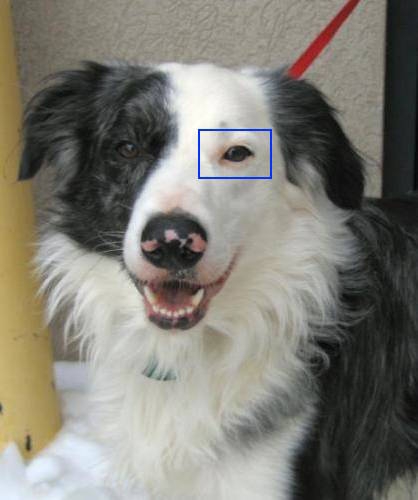
Computer only sees it as bunch of 0 to 255 numbers after we preprocess the image.
2,233,176,234,273,120,165,78,95,63,12,233...
Okay, computer sees numbers, but how can it classify if a given image is a dog or a cat? For that,we’ll teach the computer to run a Convolutional Neural Network.
CNN can solve this classification problem by looking at a ton of pictures of dogs and cats and their respective labels and find patterns among them.
Image Preprocessing
I already mention preprocessing twice on this tutorial but haven't really explain what it is.
Well, it is a process of modifying an input, to produce an output that we can fed to another program or algorithm.
For example, we have a picture of a dog(418 x 500 pixels), then we have another image of a dog (300 x 350 pixels).
We can preprocess it by updating its dimension, make it all similar like 150 x 150 pixels, then converting the image into an array of number between 0 to 255. Here's a quick example.
We load an image of a dog and convert it to 150 x 150 px

Then we convert the image into an array of numbers that computer can easily understand (classify)

Get Our Data
Our next task is to get more images so we can create our First ConvNets (Convolutional Neural Networks, CNNs)
We will use Dog vs Cats datasets on Kaggle. Download the data here.
We only need the train datasets on this tutorial, extract it relative to your jupyter notebook file, change the folder name from train to dogs-and-cats, to make it clearer.

Code Our First Convolutional Neural Networks (CNN) Model
First we need to import some libraries
import tensorflow as tf
from tensorflow import keras
import os
import shutil
import random
import glob
Then we need to divide our Dogs and Cats images into three groups
Train - we'll use to train our model
Validation - use to evaluate our model and update it's hyperparameters
Test - the final evaluation for our trained model
Go inside dogs-and-cats folder
os.chdir('./dogs-and-cats')
Create 3 folders for train, test, and validation.
I will use 100 images for testing and validating and 300 images for training
if os.path.isdir('train/dog') is False:
    os.makedirs('train/dog')
    os.makedirs('train/cat')
    os.makedirs('test/dog')
    os.makedirs('test/cat')
    os.makedirs('valid/dog')
    os.makedirs('valid/cat')

    for c in random.sample(glob.glob('cat*'), 300):
        shutil.move(c, 'train/cat')
    for c in random.sample(glob.glob('dog*'), 300):
        shutil.move(c, 'train/dog')
    for c in random.sample(glob.glob('cat*'), 100):
        shutil.move(c, 'valid/cat')
    for c in random.sample(glob.glob('dog*'), 100):
        shutil.move(c, 'valid/dog')
    for c in random.sample(glob.glob('cat*'), 100):
        shutil.move(c, 'test/cat')
    for c in random.sample(glob.glob('dog*'), 100):
        shutil.move(c, 'test/dog')
After that, we need to go back to the main directory
os.chdir('..')
Now that we have our images ready, let us preprocess it using Tensorflow Keras Image Processing
Set our paths
train_path = './dogs-and-cats/train'
valid_path = './dogs-and-cats/valid'
test_path = './dogs-and-cats/test'
Process it using ImageDataGenerator, we convert the dimension to 150x150, and scale the image by 1/255, so the result would be values from 0 to 1
from tensorflow.keras.preprocessing.image import ImageDataGenerator

train_datagen = ImageDataGenerator(rescale=1./255)
valid_datagen = ImageDataGenerator(rescale=1./255)
test_datagen = ImageDataGenerator(rescale=1./255)

train_generator = train_datagen.flow_from_directory(
        train_path,
        target_size=(150, 150),
        batch_size=20,
        class_mode='binary')

validation_generator = valid_datagen.flow_from_directory(
        valid_path,
        target_size=(150, 150),
        batch_size=20,
        class_mode='binary')

test_datagen = test_datagen.flow_from_directory(
        test_path,
        target_size=(150, 150),
        batch_size=20,
        class_mode='binary')
Now let's visualize the output of one of these generators
imgs, labels = next(train_generator)

def plotImages(images_arr, labels_arr):
    fig, axes = plt.subplots(4,5, figsize=(20,20))
    axes = axes.flatten()
    index = 0
    label_names = ['Cats', 'Dogs']
    for img, ax in zip (images_arr, axes):
        ax.imshow(img)
        ax.set_xlabel(label_names[int(labels_arr[index])])
        index += 1
    plt.tight_layout()
    plt.show()

plotImages(imgs, labels)
As you can see, the images are already preprocessed

Now we will create our Convolutional Neural Network Model
from tensorflow.keras import layers
from tensorflow.keras import models

model = models.Sequential()
model.add(layers.Conv2D(32, (3, 3), activation='relu', input_shape=(150, 150, 3)))
model.add(layers.MaxPooling2D((2, 2)))
model.add(layers.Conv2D(64, (3, 3), activation='relu'))
model.add(layers.MaxPooling2D((2, 2)))
model.add(layers.Conv2D(64, (3, 3), activation='relu'))
model.add(layers.Flatten())
model.add(layers.Dense(64, activation='relu'))
model.add(layers.Dense(1, activation='sigmoid'))
Basically, a CNN model is just a stacks of Conv2D and MaxPooling2D layers.
A Convnet takes an input shape of height, width and channels.
Conv2D layer creates a convolutional kernel that is used for blurring, sharpening, edge detection and more.
MaxPooling2D layer downsamples the input representation by taking the maximum value over the window defined by pool_size parameter (on our case (2,2))
Here's a simple example

If you want to learn more about MaxPooling2d, here’s an awesome video you can watch
Flatten layer transforms the output from the previous Conv2D layer into a 1D tensor and it will be used as input to the following Dense layer.
Our last layer is a Dense layer with one node and Sigmoid activation function. Sigmoid is use for a binary classification problem.
Let see our model's architecture
model.summary()

We can now define our model's compiler, we will use RMSprop in this example, you can also experiment using Adam optimizer
from tensorflow.keras import optimizers
model.compile(loss='binary_crossentropy',
              optimizer=optimizers.RMSprop(lr=1e-4),
              metrics=['acc'])
We define our loss function as binary_crossentropy because we're only classifying if the given image is Dog or Cat, a binary classfication problem.
Then we will train our model
history = model.fit_generator(
      train_generator,
      epochs=20,
      validation_data=validation_generator,
      validation_steps=50)
After just 20 epochs, we achive 89% accuracy, not bad for our simple CNN model.

Let us try to update our model architecture by adding more layers and nodes.
Picking the right network architecture is more an art than a science according to the Keras Creator himself François Chollet.
Don't be afraid to play on the number of layers and nodes you’ll use.
Now let’s try this CNN model architecture
model = models.Sequential()
model.add(layers.Conv2D(32, (3, 3), activation='relu',
                        input_shape=(150, 150, 3)))
model.add(layers.MaxPooling2D((2, 2)))
model.add(layers.Conv2D(64, (3, 3), activation='relu'))
model.add(layers.MaxPooling2D((2, 2)))
model.add(layers.Conv2D(128, (3, 3), activation='relu'))
model.add(layers.MaxPooling2D((2, 2)))
model.add(layers.Conv2D(128, (3, 3), activation='relu'))
model.add(layers.MaxPooling2D((2, 2)))
model.add(layers.Flatten())
model.add(layers.Dense(512, activation='relu'))
model.add(layers.Dense(1, activation='sigmoid'))
We have added more nodes, Conv2d and MaxPooling2D layers. Here’s our model summary
model.summary()

Let’s compile and train our new model
model.compile(loss='binary_crossentropy',
              optimizer=optimizers.RMSprop(lr=1e-4),
              metrics=['acc'])

history = model.fit_generator(
      train_generator,
      steps_per_epoch=100,
      epochs=10,
      validation_data=validation_generator,
      validation_steps=50)
After 10 epochs, are model achieved Traing Accuracy of 98%, quite better than our previous model.

As you can see, our Training Accuracy is so much better than our Validation Accuracy.
This is called Overfitting and we’ll discuss it on our next Blog. Stay tuned!
Once again, thank you for reading.